Know what is due and keep your business paperwork moving

Running a business in India means keeping track of filings, answering unfamiliar legal questions and preparing documents when you need them. Legalway.io brings that work into one account, with a personalised compliance calendar, an AI Legal Assistant and tools for drafting and reviewing documents.

Legalway dashboard showing pending obligations, completed tasks and recent documents
Review pending obligations and recent documents in one place.

Stop piecing together deadlines and documents from different places

A filing date might be in a spreadsheet, an appointment letter in an old email and a contract question waiting for someone to answer. Legalway.io gives you a place to organise this work and see what needs attention.

Complete your business profile so the platform can identify relevant obligations. Use the assistant when you need an explanation, and prepare common documents from structured templates instead of starting with a blank page.

See how Legalway works

Follow one example business from account creation to its calendar, a legal question and a document draft. The walkthrough shows which features are included in Free and which require a paid plan.

Legalway walkthrough showing the dashboard, compliance calendar and document editor
A short walkthrough of your business profile, compliance calendar and document tools.
Read the walkthrough transcript

A filing deadline in one place, an appointment letter in another, and a contract question still waiting for an answer. Legalway brings that work into one account.

Create your account and add your business details, including its structure, location and tax registrations. Legalway uses this profile to organise the obligations relevant to your business.

With a paid plan, review the full compliance calendar and receive reminders by email and in the app. File through your usual process, then mark the item complete.

When you need an explanation, ask the AI Legal Assistant. Read the answer, check its sources, or attach a document and ask for a plain English summary.

Prepare an NDA or appointment letter from a standard template, review the clause check and download a Word file. On Pro, you can also draft a custom contract through a conversation.

Create a free account to explore five AI messages each month and three generated documents in total. Legalway provides information and drafts. Use professional advice when the matter requires it.

What you can do with Legalway

A clearer view of your compliance work

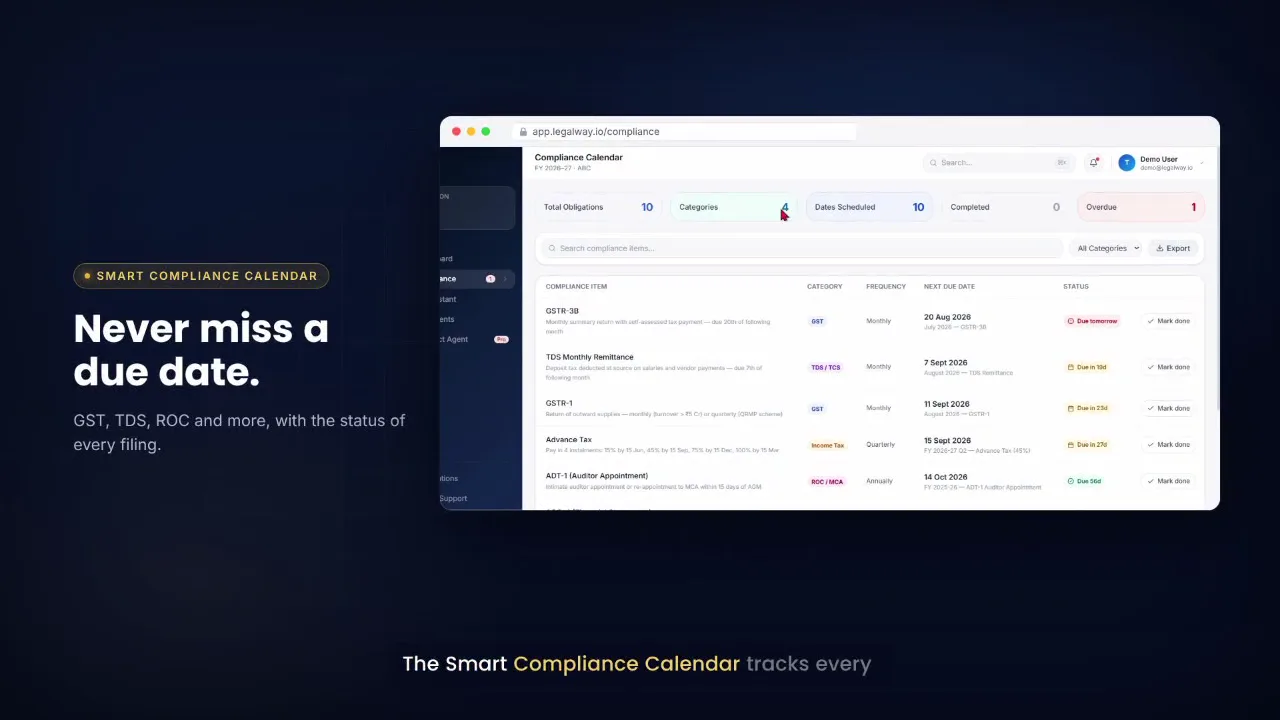
The Compliance Calendar organises obligations around the details you provide about your business, including its entity type, location, employees and tax registrations. Review upcoming dates, filter by category and mark an item when work is in progress or complete.

Paid plans include email and app reminders as deadlines approach. Your dashboard brings pending tasks, completed tasks and recent documents into one view.

Explore the Compliance Calendar

Ask the question that is holding up your next step

Use the AI Legal Assistant for an initial explanation of a deadline, registration or legal term. Ask about the obligations in your account, or attach a PDF or Word document and request a plain English summary.

Answers include sources you can open and review. When a question needs advice about your particular circumstances, take the information to your CA, CS or lawyer.

Explore the AI Legal Assistant

Prepare documents with a useful starting point

Choose an NDA or appointment letter template, enter the relevant details and download a Word document. Legalway uses templates authored by lawyers, with a clause check to flag expected clauses that are missing from generated documents.

On Pro, the Contract Drafting Agent helps you prepare a custom first draft through a conversation. You can request changes, review the result and download it for further review.

Explore Documents and Contracts

How your account comes together

  1. Create your account.

    Register with your email address and password.

  2. Add your business details.

    Complete the three profile steps covering your details, your business and its tax registrations.

  3. Review your workspace.

    See your dashboard and use the tools included in your plan. Paid plans unlock the personalised calendar and reminders.

  4. Keep the record current.

    File obligations yourself or through your professional advisor, then record their status in Legalway. Ask questions and prepare documents as work comes up.

Legalway business profile form with entity type, employee count, state and tax registration fields

Built for the people who handle business paperwork

Founders and business owners

Keep a view of upcoming obligations while handling the rest of the business. Ask an initial question about an unfamiliar requirement and prepare routine documents without searching through old files.

Finance, HR and admin teams

Organise recurring compliance work and appointment letters in one account. See which obligations are still pending and keep the status current after a filing is completed.

CAs, CSs and lawyers

Use the calendar as a checklist when working with a business. Review document summaries and generated drafts as part of your professional work, with the relevant records close at hand.

Know what is included before you choose

Free lets you explore the assistant and document tools with defined usage limits. Early Subscriber adds the full calendar, reminders and higher monthly allowances. Pro includes the Contract Drafting Agent and unlimited standard document generation.

Free includes 5 AI messages each month and 3 generated documents in total. Full calendar access and deadline reminders are included in paid plans.

Free

  • 5 AI Assistant messages per month
  • 3 generated documents in total
  • Blurred calendar preview

Early Subscriber

  • 50 AI Assistant messages per month
  • 25 generated documents per month
  • Full calendar with email and app reminders

Pro

  • 300 AI Assistant messages per month
  • Unlimited standard document generation
  • Contract Drafting Agent

Your account and information

Each organisation's records are separated within the platform. Data is encrypted in transit and at rest, and payments are processed through Razorpay. Legalway does not store your card, UPI or bank payment details.

Relevant questions and document content are processed by the AI provider when you use AI features. Read the Privacy Policy for the details of how information is handled.

Questions before you sign up

Does Legalway file returns for me?

Legalway helps you track obligations and their status. You or your CA complete the filing, then mark the item in the calendar.

Can I use Legalway without paying?

Yes. Free includes the dashboard, 5 AI Assistant messages per month and 3 generated documents in total. The calendar appears as a blurred preview, and reminders require a paid plan.

Is Legalway a law firm?

No. It provides compliance information and document drafting tools. AI responses and generated documents are not legal advice.

Can I ask about a document I already have?

Yes. Attach a PDF or Word document to the AI Assistant and ask for an explanation or summary, within your plan's message allowance.

Put your next compliance task in one place

Create your account, add your business details and explore the tools available to you. Choose a paid plan when you need the full calendar, reminders or more document capacity.